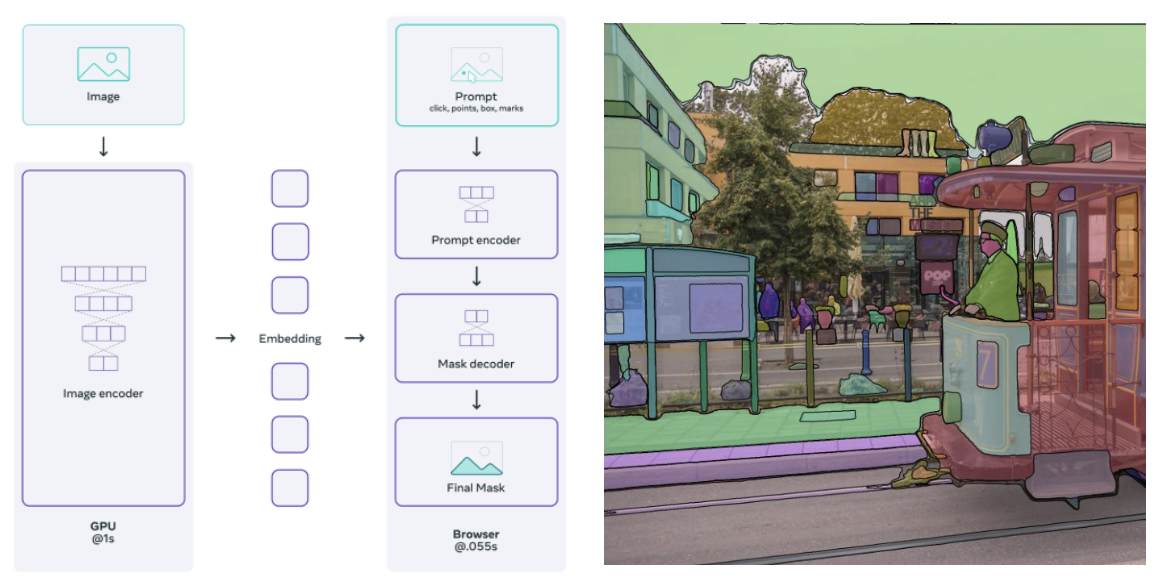
 Segment Anything (SAM) has drawn massive attention in the computer vision community, accumulating an impressive 8,000 citations. Segmentation has long been a crucial yet challenging aspect of computer vision. One of the biggest hurdles? Annotation. Unlike simple bounding boxes, which only require marking the object’s general location, segmentation demands precise pixel-level annotations—an incredibly tedious and time-consuming task for annotators. SAM is one of the first large-scale foundation models for segmentation. What makes SAM truly great is that it’s a promptable model. This means you can use it for various tasks without the need for fine-tuning—also known as zero-shot learning. Unlike LLM, here the prompts for the SAM are points, bounding boxes, and masks. In this post, we’re going to explore the key components of SAM. This guide will break things down in a simple and easy-to-follow way. Let’s get started! 🚀.
1. SAM Architecture Overview
 The SAM (Segment Anything Model) architecture consists of three main components: an image encoder, a prompt encoder, and a mask decoder. The image encoder processes the input image to generate an embedding, while the prompt encoder takes user-provided prompts (such as points, boxes, or text) to refine the segmentation. The mask decoder then combines these embeddings and prompts to produce multiple valid segmentation masks, each with an associated confidence score.
2. Image Encoder
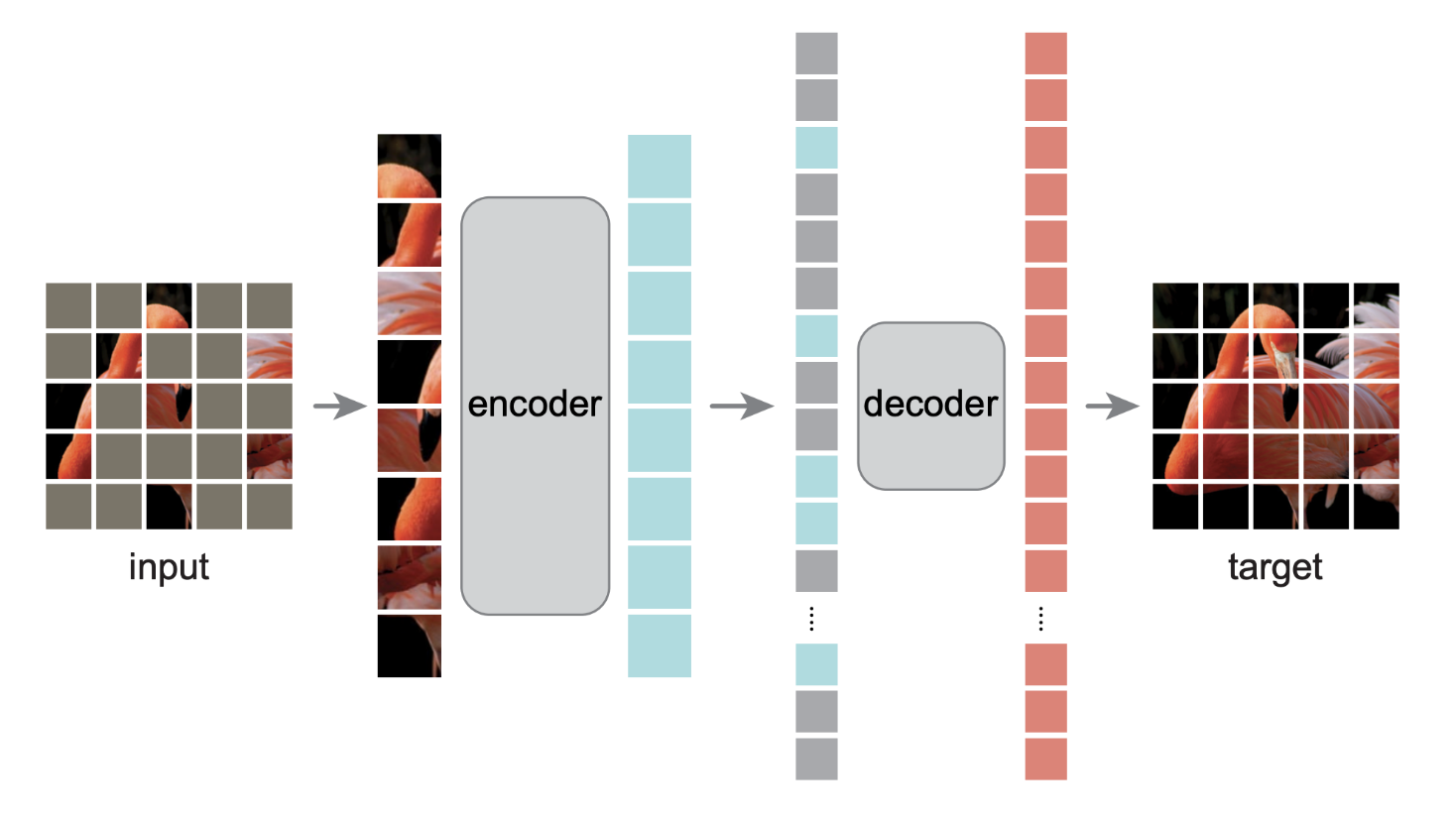 The image encoder of SAM (Segment Anything Model) is quite straightforward. The authors pre-trained the Vision Transformer (ViT) using Masked Autoencoder (MAE)—both of which are widely recognized techniques in the computer vision community.
ViT is one of the pioneering large-scale foundation models for image classification. Meanwhile, MAE is well known for its effectiveness in pre-training models. The idea behind MAE is simple yet powerful: it randomly applies zero-masking to some image patches before passing them through the encoder. The decoder then attempts to reconstruct the masked patches, forcing the model to develop a deeper understanding of image structures. Essentially, the \(1024 \times 1024\) image is embedded into feature space \(\mathbb{R}^{256 \times 64 \times 64}\).
3. Prompt Encoder
The prompt encoder takes three types inputs: points, bounding boxes, text, and mask. Points, bounding boxes, and text are treated sparse prompt. The mask is treated as dense prompt. However, the authors said that text prompts are just an exploration, so we won’t cover them in this article. The prompt encoder has two jobs mainly: sparse prompt embedding and dense prompt embedding. However, if you see the PromptEncoder implementation, you will notice there is one more thing it returns, which is image positional embedding. We will learn how these three embeddings are processed.
3.1. Image Positional Embedding
To ensure the decoder has access to critical geometric information the positional encodings are added to the image embedding whenever they participate in an attention layer. - SAM, Segment Anything Model and Task Details, Lightweight mask decoder
The authors said positional encodings are added to the image embedding. It encodes positional information for the entire image feature grid. The concept of positional encoding was originated from transformer. Transformers use self-attention to process inputs, but unlike RNNs or CNNs, they do not inherently capture positional information (i.e. permutation-invariant). Positional encoding is added to the input embeddings to provide a sense of order in the sequence. The image below shows how positional embedding and image embedding are added in transformer.
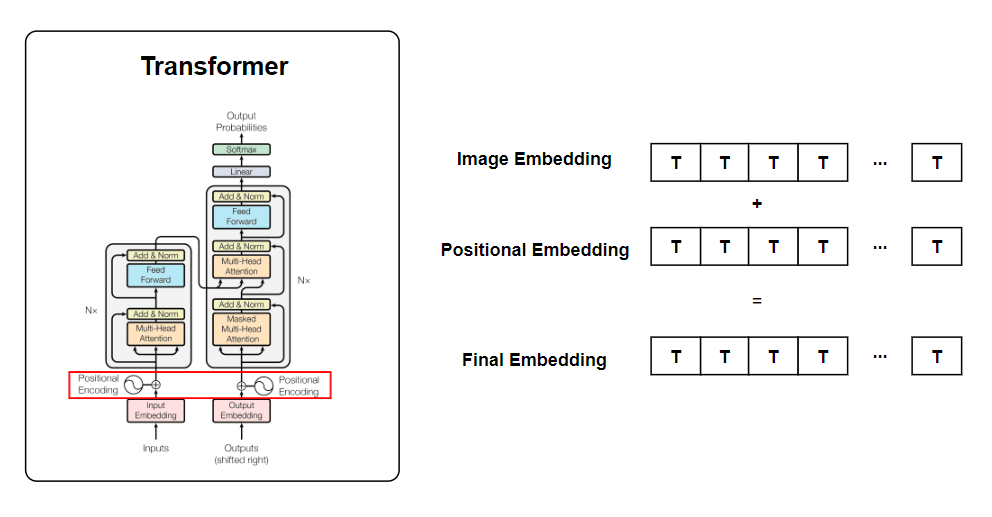
What would be the dimension of positional encoding? It’s \(256 \times 64 \times 64\), which matches the dimension of the image embedding. This is because the image embedding and image positional embedding are added together element-wise. Let’s review a part of the PromptEncoder implementation.
class PromptEncoder(nn.Module):
    def __init__():
        #skip...
        self.pe_layer = PositionEmbeddingRandom(embed_dim // 2)

    def get_dense_pe(self) -> torch.Tensor:
        return self.pe_layer(self.image_embedding_size).unsqueeze(0)

class PositionEmbeddingRandom(nn.Module):
    def __init__(self, num_pos_feats: int = 64, scale: Optional[float] = None) -> None:
        super().__init__()
        if scale is None or scale <= 0.0:
            scale = 1.0
        self.register_buffer(
            "positional_encoding_gaussian_matrix",
            scale * torch.randn((2, num_pos_feats)),
        )

    def _pe_encoding(self, coords: torch.Tensor) -> torch.Tensor:
        coords = 2 * coords - 1
        coords = coords @ self.positional_encoding_gaussian_matrix
        coords = 2 * np.pi * coords
        # outputs d_1 x ... x d_n x C shape
        return torch.cat([torch.sin(coords), torch.cos(coords)], dim=-1)

    def forward(self, size: Tuple[int, int]) -> torch.Tensor:
        h, w = size
        device: Any = self.positional_encoding_gaussian_matrix.device
        grid = torch.ones((h, w), device=device, dtype=torch.float32)
        y_embed = grid.cumsum(dim=0) - 0.5
        x_embed = grid.cumsum(dim=1) - 0.5
        y_embed = y_embed / h
        x_embed = x_embed / w

        pe = self._pe_encoding(torch.stack([x_embed, y_embed], dim=-1))
        return pe.permute(2, 0, 1)  # C x H x W
In essence, get_dense_pe function returns image positional embedding, which later will be passed to the mask decoder. In forward function, it shows how image positional embeddings are constructed for the entire 64 x 64 feature grid into four steps
- Creates a coordinate grid for the feature map.
- Normalizes x and y coordinates to \([0,1]\).
- Centers the ccoordinates such that \([-0.5, 0.5]\)
- Apply positional encoding
When creating the grid, it first initializes 2d tensor filled with ones. For x and y axis, cumsum computes cumulative sum along each axis. For example, if h=3, w = 3, then cumsum does:
x_embed = grid.cumsum(dim=1) - 0.5
y_embed = grid.cumsum(dim=0) - 0.5
After normalization and certering the coordinates, it performs positional encoding. Mathmatically, postional encdoing is given by:
\[ \text{PE}(x,y) = \sin(2\pi W \begin{bmatrix} x \\ y \end{bmatrix}) \oplus \cos(2\pi W \begin{bmatrix} x \\ y \end{bmatrix}) \]where:
- \(\begin{bmatrix} x \\ y \end{bmatrix} \in \mathbb{R}^{B \times H \times W \times 2}\) is a stacked grid feature.
- \(W \in \mathbb{R}^{2 \times d}\) is the Gaussian projection matrix that maps 2D coordinates to a higher-dimensional space.
- \(\oplus\) refers to concatenation along the feature dimension.
- \(\text{PE}(x,y) \in \mathbb{R}^{B \times H \times W \times 2d}\) is the final positional encoding
Now that we understand how image positional embeddings are computed. These embeddings, along with sparse and dense prompts, will be passed to the mask decoder to guide segmentation.
3.2. Point Embedding
We can pass \(N\) number of points per image to SAM. Each point acts as a spatial cue, helping the model focus on specific regions of interest within the image. These points are then transformed into high-dimensional-sparse embeddings.
class PromptEncoder(nn.Module):
    def __init__(
      #some arguements...
    )
    super().__init__()
        self.embed_dim = embed_dim
        self.input_image_size = input_image_size
        self.image_embedding_size = image_embedding_size
        self.pe_layer = PositionEmbeddingRandom(embed_dim // 2)
        point_embeddings = [nn.Embedding(1, embed_dim) for i in range(self.num_point_embeddings)]
        self.point_embeddings = nn.ModuleList(point_embeddings)

    def _embed_points(
        self,
        points: torch.Tensor,
        labels: torch.Tensor,
        pad: bool,
    ) -> torch.Tensor:
        """Embeds point prompts."""
        points = points + 0.5  # Shift to center of pixel
        if pad:
            padding_point = torch.zeros((points.shape[0], 1, 2), device=points.device)
            padding_label = -torch.ones((labels.shape[0], 1), device=labels.device)
            points = torch.cat([points, padding_point], dim=1)
            labels = torch.cat([labels, padding_label], dim=1)
        point_embedding = self.pe_layer.forward_with_coords(points, self.input_image_size)
        point_embedding[labels == -1] = 0.0
        point_embedding[labels == -1] += self.not_a_point_embed.weight
        point_embedding[labels == 0] += self.point_embeddings[0].weight
        point_embedding[labels == 1] += self.point_embeddings[1].weight
        return point_embedding

    def forward(
        self,
        points: Optional[Tuple[torch.Tensor, torch.Tensor]],
        boxes: Optional[torch.Tensor],
        masks: Optional[torch.Tensor],
    ) -> Tuple[torch.Tensor, torch.Tensor]:
        bs = self._get_batch_size(points, boxes, masks)
        sparse_embeddings = torch.empty((bs, 0, self.embed_dim), device=self._get_device()) #place holder
        if points is not None:
            coords, labels = points
            point_embeddings = self._embed_points(coords, labels, pad=(boxes is None))
            sparse_embeddings = torch.cat([sparse_embeddings, point_embeddings], dim=1)
Okay, let’s go into detail on how points and boxes are encoded.
self.pe_layer, which is an object of PositionEmbeddingRandom, maps coordinates into a higher-dimensional space. The member function forward_with_coords performs normalization, linear projection, and sinusoidal transformation, same as we did for image positional embedding.
where:
- \(x,y \in \mathbb{R}^{B \times N \times 2}\) is input coordinates (batch of 𝑁 points per image).
- \(W \in \mathbb{R}^{2 \times d}\)
- \(\text{PE}(x,y) \in \mathbb{R} ^{B \times N \times 2d}\)
Before we analyze what happens after executing point_embedding = self.pe_layer.forward_with_coords(points, self.input_image_size) is excuted, let’s first discuss positive (foreground) points and negative (background) points. Actually, SAM has a feature that I haven’t mentioned yet—you can provide background points. A background point is a point that you are not interested in and explicitly mark as not part of the object. See the image below, or you can test this in the demo.
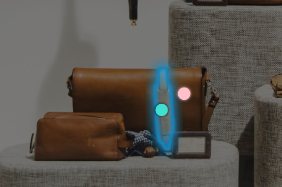
In the image, the blue dot represents a positive point, while the red dot represents a negative point. But wait! why do we need labels for the forward pass? In this context, labels are not ground truth segmentation masks. Instead, they indicate whether each click is a positive (foreground) or negative (background) point when passing inputs to the prompt encoder. So, the label is an array of size \(N\), where each entry is either 1 (positive) or 0 (negative).
As sparse_embeddings is an empty tensor that has zero dimension in sequnence dimension, the concatenation with point_embeddings doesn’t affect the shape of tensor.
3.3. Box Encoding
The bounding box is defined by four coordinates \((x_1, y_1, x_2,y_2)\), representing the top-left and bottom-right corners.
class PromptEncoder(nn.Module):
    def __init__(
      #some arguements...
    )

    def _embed_points(self, points, labels, pad):
         #skip...
        return point_embedding

    def _embed_boxes(self, boxes: torch.Tensor) -> torch.Tensor:
        """Embeds box prompts."""
        boxes = boxes + 0.5  # Shift to center of pixel
        coords = boxes.reshape(-1, 2, 2)
        corner_embedding = self.pe_layer.forward_with_coords(coords, self.input_image_size)
        corner_embedding[:, 0, :] += self.point_embeddings[2].weight
        corner_embedding[:, 1, :] += self.point_embeddings[3].weight
        return corner_embedding

    def forward(
        self,
        points: Optional[Tuple[torch.Tensor, torch.Tensor]],
        boxes: Optional[torch.Tensor],
        masks: Optional[torch.Tensor],
    ) -> Tuple[torch.Tensor, torch.Tensor]:

        bs = self._get_batch_size(points, boxes, masks)
        sparse_embeddings = torch.empty((bs, 0, self.embed_dim), device=self._get_device())

        if points is not None:
            coords, labels = points
            point_embeddings = self._embed_points(coords, labels, pad=(boxes is None))
            sparse_embeddings = torch.cat([sparse_embeddings, point_embeddings], dim=1)

        if boxes is not None:
            box_embeddings = self._embed_boxes(boxes)
            sparse_embeddings = torch.cat([sparse_embeddings, box_embeddings], dim=1)
Similar to points, these coordinates are mapped to positional encodings using sinusoidal transformation. However, unlike point_embedding, which consists of N points, corner_embedding represents only one bounding box per image. You can see this from the line, coords = boxes.reshape(-1, 2, 2), which reshapes the input into \(B \times 2\). Here, the last two dimensions represent the (x, y) coordinates of the two corners (top-left and bottom-right) of the bounding box.
After mapping the box to positional embedding, we add learnable parameters to the top-left and bottom-right corners.
        corner_embedding[:, 0, :] += self.point_embeddings[2].weight
        corner_embedding[:, 1, :] += self.point_embeddings[3].weight
Eventually, box_embeddings will have the dimension of \(\mathbb{R}^{B,2,2d}\).
Let’s take a look at how sparse_embeddings are udpated. sparse_embedding is initiallized with empty tensor with the dimension of \(\mathbb{R}^{B \times N \times C}\) where \(C=2d\).
If both points and a box are provided as input, the prompt encoder concatenates sparse_embeddings with point_embeddings and box_embeddings, updating its shape accordingly. Eventually, the final sparse prompt embedding’s dimension will be:
I have a question for you. What will be the dimension of \(\text{PE}_{\text{sparse}}\) when only points prompt is given without bounding box. What about only bounding box is given? We have three input scenarios
- \(N\) points prompts, No bounding box ➡️ \(\mathbb{R}^{B \times N \times C}\)
- No points prompts, one bounding box ➡️ \(\mathbb{R}^{B \times 2 \times C}\)
- \(N\) points prompts, one bounding box ➡️ \(\mathbb{R}^{B \times N + 2 \times C}\)
Something is odd. How we can forward pass tensor that has different sequence length (middle dimension) for each pass? If you can’t answer this question, you can read my previous post. In short, there is no nn.Linear (project layer) in prompt encoder so we don’t need to care about variable-length sequnces.
3.4. Dense prompt encoding
Unlike sparse prompts, which are first mapped to an embedding space using positional encoding, dense prompts are directly projected using convolutions and then summed element-wise with the image embedding.The input mask is a binary tensor \( M \) of shape:
\[ M \in \mathbb{R}^{B \times 1 \times 256 \times 256} \]where:
- \( B \) is the batch size.
- The single channel (1) represents a binary mask (foreground vs. background).
- \( 256 \times 256 \) is a fixed spatial resolution for masks in SAM.
In the Prompt Encoder, the mask undergoes convolutional transformations to extract meaningful features. This is done in the _embed_masks function:
class PromptEncoder(nn.Module):
    def __init__(
        self,
        embed_dim: int,
        image_embedding_size: Tuple[int, int],
        input_image_size: Tuple[int, int],
        mask_in_chans: int,
        activation: Type[nn.Module] = nn.GELU,
    )
        self.mask_downscaling = nn.Sequential(
            nn.Conv2d(1, mask_in_chans // 4, kernel_size=2, stride=2),
            LayerNorm2d(mask_in_chans // 4),
            activation(),
            nn.Conv2d(mask_in_chans // 4, mask_in_chans, kernel_size=2, stride=2),
            LayerNorm2d(mask_in_chans),
            activation(),
            nn.Conv2d(mask_in_chans, embed_dim, kernel_size=1),
        )

    def _embed_masks(self, masks: torch.Tensor) -> torch.Tensor:
        """Embeds mask input."""
        mask_embedding = self.mask_downscaling(masks)
        return mask_embedding

    def forward(
        self,
        points: Optional[Tuple[torch.Tensor, torch.Tensor]],
        boxes: Optional[torch.Tensor],
        masks: Optional[torch.Tensor],
    )
        #skip sparse prompt

        if masks is not None:
            dense_embeddings = self._embed_masks(masks)
        else:
            dense_embeddings = self.no_mask_embed.weight.reshape(1, -1, 1, 1).expand(
                bs, -1, self.image_embedding_size[0], self.image_embedding_size[1]
            )

        return sparse_embeddings, dense_embeddings
mask_downscaling is a learnable CNN module that reduces the resolution of the mask while increasing its feature depth. This converts the binary mask into an embedding space that aligns with the image features. The resulting mask embedding has the shape: \(\mathbb{R}^{B \times C \times H' \times W'}\), where \(C=256, H'=64, W'=64\). Now the mask embedding dimension matches the image embedding so that both can be used together in the mask decoder.
However, if no mask is given (masks=None), SAM instead uses a learnable “no-mask” embedding. self.no_mask_embed.weight is a learnable tensor representing a default mask embedding when a mask is not given. It is reshaped and expanded to match the required shape, \(\mathbb{R}^{B \times C \times H' \times W'}\). This ensures that even when no mask is provided, the model still has a valid dense prompt embedding.
4. Mask Decoder
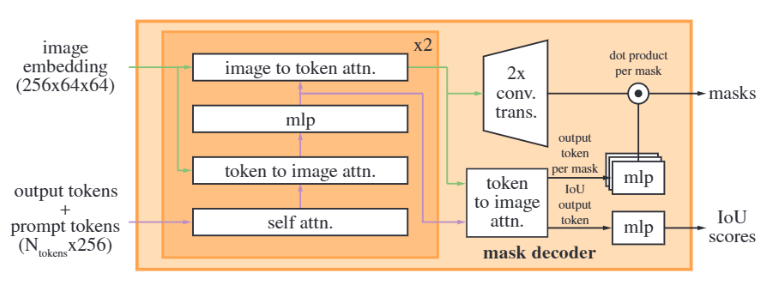 So far, we have got four embeddings before we pass them to mask decoder:
- image embedding
- image positional embedding
- sparse prompt embedding
- dense prompt embedding
The mask decoder returns two objects: a mask and an IoU confidence score. Before we go deeper, let me ask how familiar you are with the transformer decoder. Before I studid this paper, I was not familiar with the transformer decoder, as I mostly worked with ViT or Swin Transformer, which only use the encoder of a transformer. Let me give you a quick recap about transformer decoder. A Transformer decoder takes “output embedding” as input. The output embedding representation is refined through attention mechanism. In the next training step, the highest logit token is mapped back to an output embedding. In the decoder’s attention stage, the model attends to the encoder’s output. This process is called cross-attention.
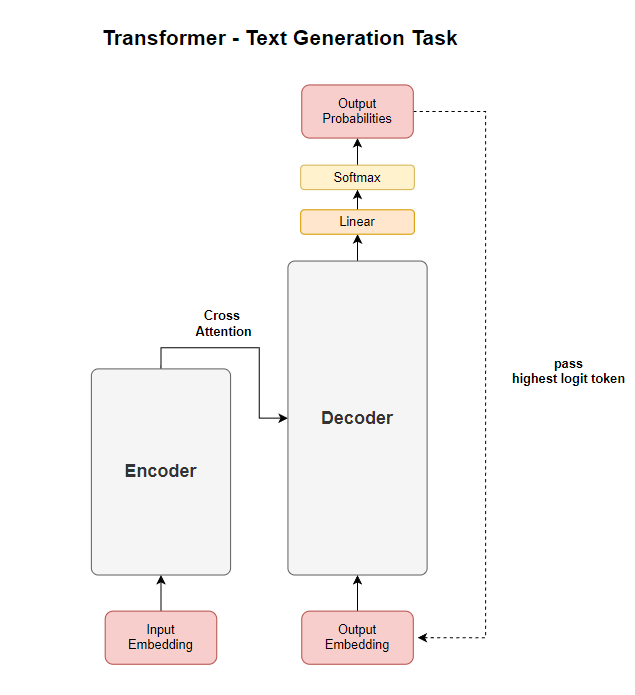
Now that we’ve covered the basics of the Transformer decoder, let’s dive into SAM’s mask decoder. Unlike text generation models, where the decoder outputs a sequence of tokens, SAM’s mask decoder is designed to predict segmentation masks based on mask tokens. SAM’s mask decoder follows a similar structure to a Transformer decoder but is tailored for image segmentation. The key difference is that instead of processing text tokens, the decoder refines mask tokens to generate segmentation masks.
4.1. Input Processing for Mask Decoder
The decoder starts with a set of learnable mask tokens and an IoU token. These tokens act as placeholders, similar to how DETR initializes object queries for object detection.
class MaskDecoder(nn.Module):
    def __init__(): #skip parameters
        #skip
        self.iou_token = nn.Embedding(1, transformer_dim)
        self.num_mask_tokens = num_multimask_outputs + 1
        self.mask_tokens = nn.Embedding(self.num_mask_tokens, transformer_dim)
The IoU token has dimension of \(\mathbb{R}^{1 \times 256}\) and mask token has dimension of \(\mathbb{R}^{4 \times 256}\).
You might wonder why the sequence dimension of mask token is four. SAM produces three masks by default considering a single input prompt may be ambiguous. This means even if you provides single point as prompt, SAM will give you three masks. Then why four not three? The default mask token is added to the three tokens. This token is used when an user doesn’t want multi-mask option.
masks, _, _ = predictor.predict(
    point_coords=input_point,
    point_labels=input_label,
    multimask_output=False,
)
This ensures that SAM always has a fallback “default mask” in addition to the three multimask outputs. The first token is used when multimask_output is off. The three tokens are used when multimask_output is on.
class MaskDecoder(nn.Module):
    def forward(): #skip parameters
        if multimask_output:
            mask_slice = slice(1, None)  # Selects the three multimask outputs
        else:
            mask_slice = slice(0, 1)  # Selects only the first mask (default)
        masks = masks[:, mask_slice, :, :]
The IoU tokens and mask tokens are concatenated with sparse prompt embeddings before passing them through the Transformer.
class MaskDecoder(nn.Module):
    def forward(): #skip parameters
        masks, iou_pred = self.predict_masks(
            image_embeddings=image_embeddings,
            image_pe=image_pe,
            sparse_prompt_embeddings=sparse_prompt_embeddings,
            dense_prompt_embeddings=dense_prompt_embeddings,
        )

    def predict_masks(
        self,
        image_embeddings: torch.Tensor,
        image_pe: torch.Tensor,
        sparse_prompt_embeddings: torch.Tensor,
        dense_prompt_embeddings: torch.Tensor,
    ):
        output_tokens = torch.cat([self.iou_token.weight, self.mask_tokens.weight], dim=0)
        output_tokens = output_tokens.unsqueeze(0).expand(sparse_prompt_embeddings.size(0), -1, -1)
        tokens = torch.cat((output_tokens, sparse_prompt_embeddings), dim=1)
        tokens = torch.cat((output_tokens, sparse_prompt_embeddings), dim=1)
        src = torch.repeat_interleave(image_embeddings, tokens.shape[0], dim=0)
        src = src + dense_prompt_embeddings
        pos_src = torch.repeat_interleave(image_pe, tokens.shape[0], dim=0)
        # Run the transformer
        hs, src = self.transformer(src, pos_src, tokens)
tokens tensor has shape of \(\mathbb{R}^{B \times (N + 5) \times 256}\) where \(N\) is the number of sparse prompts. src = torch.repeat_interleave(image_embeddings, tokens.shape[0], dim=0) expands image embedding in batch dimension from \(\mathbb{R}^{B \times 256 \times 64 \times 64}\) to \(\mathbb{R}^{B' \times 256 \times 64 \times 64}\) if tokens batch size and image_embeddings batch size are different. But I am still not sure why they wrote this line. I assume these two batch sizes are always the same. Lastly, it adds image_embeddings to dense_prompt_embeddings. Now, we are done for input processing before passing to the decoder. self.transformer takes three inputs:
src: image embedding + dense promptpos_src: image positional embeddingtokens: mask token \(\oplus\) IoU token \(\oplus\)sparse prompt embeddings
4.2. TwoWayAttention Transformer
SAM’s mask decoder utilizes a TwoWayTransformer, which differs from a standard transformer decoder by incorporating two cross-attention stages: (1) tokens attending to image features and (2) image features attending to tokens. This bidirectional attention mechanism allows the model to effectively refine mask predictions by leveraging both sparse and dense prompts. The TwoWayTransformer consists of multiple layers (depth) of TwoWayAttentionBlock modules, followed by a final attention layer for mask prediction.
The TwoWayTransformer takes three main inputs:
image_embedding(B, 256, 64, 64): Image features with dense prompt (i.e. \(I + M\)).image_pe(B, 256, 64, 64): Positional encodings for image features.point_embedding(B, N+5, 256): Encoded sparse prompts.
The image embedding is first flattened from (B, 256, H, W) → (B, HW, 256) so that it can interact with the mask tokens.
bs, c, h, w = image_embedding.shape
image_embedding = image_embedding.flatten(2).permute(0, 2, 1)
image_pe = image_pe.flatten(2).permute(0, 2, 1)
Next, the query tokens (mask tokens + IoU token) interact with the image features via two stacked TwoWayAttentionBlock layers:
queries = point_embedding
keys = image_embedding

for layer in self.layers:
    queries, keys = layer(
        queries=queries,
        keys=keys,
        query_pe=point_embedding,
        key_pe=image_pe,
    )
We are passing image embedding and image positional embedding for keys and key_pe. But query_pe is just copy of query. Why are passing the two arguments for two different parameters? Well, we don’t have a separate postional encoding for point_embedding, which is concatenation of IoU tokens, mask tokens, and sparse prompt embeddings. However, the sparse prompt embedding was computed using positional encoding. Even if we are passing the point_embedding itself as positional encdoing, it has chance to learn positional information through attention mechanism. Instead, the embeddings themselves serve both as features and positional encodings, query_pe = point_embedding.
Let’s break down the two way attention block. The below diagram is a visualizaation of the two way attention block.
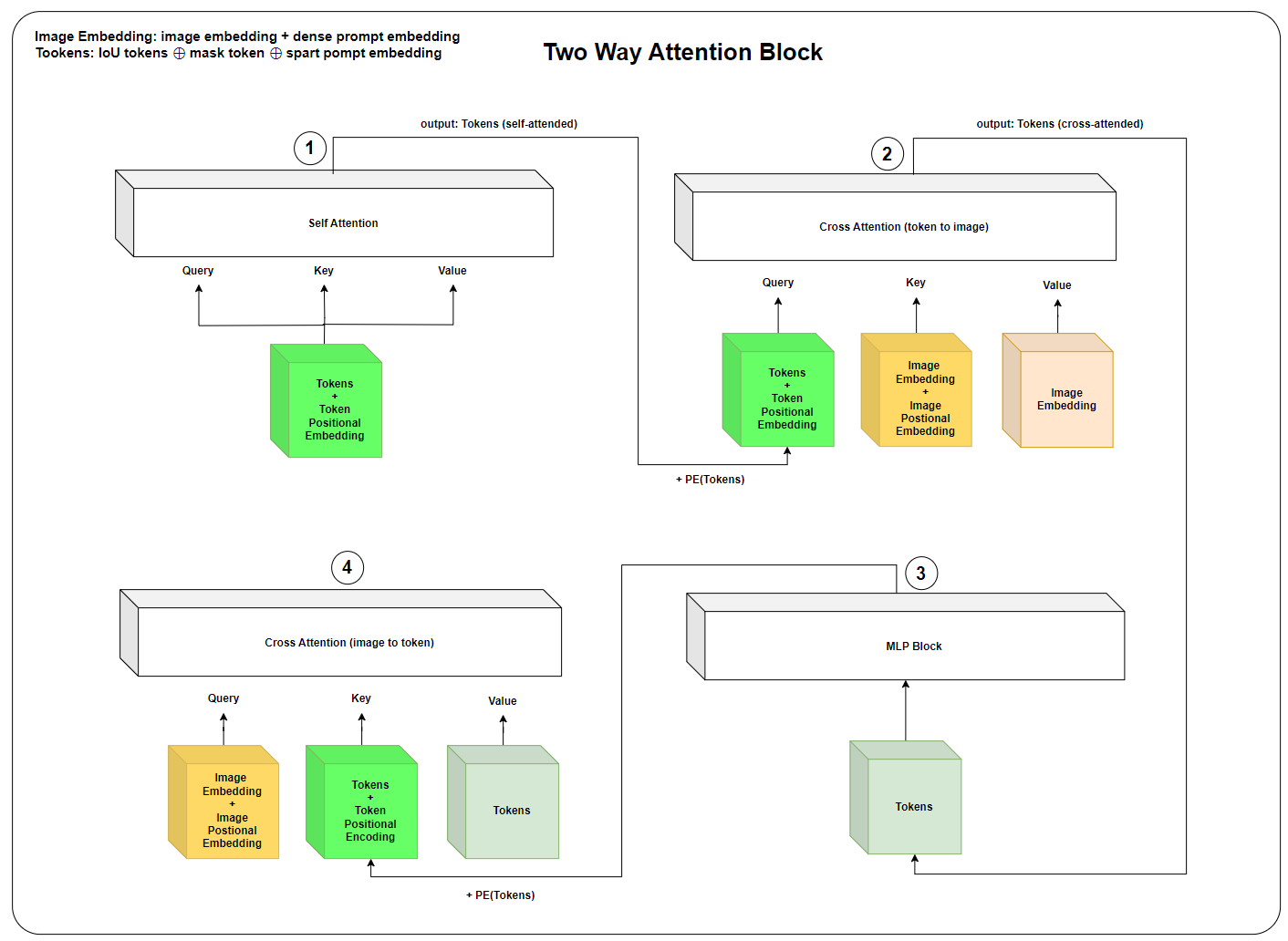
Self-Attention (Tokens)
- If it’s the first layer, positional encoding is skipped.
- Otherwise, the positional encoding (query_pe) is added before passing through the self-attention layer.
Cross-Attention (Tokens → Image Embeddings)
- Tokens (queries) attend to image embeddings (keys).
- This allows the sparse prompts (mask tokens, IoU tokens) to interact with image features.
MLP Block
- The sparse queries are passed through an MLP block for further refinement.
Cross-Attention (Image Embeddings → Tokens)
- Now, the image features (keys) attend back to the sparse queries (queries).
- This lets the image embeddings influence the sparse tokens.
After the two layers, a final cross-attention layer is applied where queries and keys interact again:
q = queries + point_embedding
k = keys + image_pe
attn_out = self.final_attn_token_to_image(q=q, k=k, v=keys)
queries = queries + attn_out
queries = self.norm_final_attn(queries)
return queries, keys
In the end, two way transformer returns tokens (IoU tokens, mask tokens, and sparse embedding) and image embedding. I recommends to check the implementation source code.
4.3. Final Output
class MaskDecoder(nn.Module):
    def init():
        #skip

        self.output_upscaling = nn.Sequential(
            nn.ConvTranspose2d(transformer_dim, transformer_dim // 4, kernel_size=2, stride=2),
            LayerNorm2d(transformer_dim // 4),
            activation(),
            nn.ConvTranspose2d(transformer_dim // 4, transformer_dim // 8, kernel_size=2, stride=2),
            activation(),
        )

        self.output_hypernetworks_mlps = nn.ModuleList(
            [
                MLP(transformer_dim, transformer_dim, transformer_dim // 8, 3)
                for i in range(self.num_mask_tokens)
            ]
        )

        self.iou_prediction_head = MLP(
            transformer_dim, iou_head_hidden_dim, self.num_mask_tokens, iou_head_depth
        )


    def predict_masks():
        #skip...
        hs, src = self.transformer(src, pos_src, tokens)
        iou_token_out = hs[:, 0, :]
        mask_tokens_out = hs[:, 1 : (1 + self.num_mask_tokens), :]
        # Upscale mask embeddings and predict masks using the mask tokens
        src = src.transpose(1, 2).view(b, c, h, w)
        upscaled_embedding = self.output_upscaling(src)
        hyper_in_list: List[torch.Tensor] = []
        for i in range(self.num_mask_tokens):
            hyper_in_list.append(self.output_hypernetworks_mlps[i](mask_tokens_out[:, i, :]))
        hyper_in = torch.stack(hyper_in_list, dim=1)
        b, c, h, w = upscaled_embedding.shape
        masks = (hyper_in @ upscaled_embedding.view(b, c, h * w)).view(b, -1, h, w)
        iou_pred = self.iou_prediction_head(iou_token_out)
        return masks, iou_pred
After transformer processed the image embedding and tokens, we extracts IoU token and mask token from tokens. The mask_tokens_out dimension is \(\mathbb{R}^{B \times 4 \times 256}\). We want masks to be 4-dimensional shape, \(\mathbb{R}^{B \times 4 \times H \times W}\). The mask tokens are transformed into mask predictions via hypernetworks, and the upscaled image features are used for final mask refinement.
src represents the transformed image embeddings after passing through the transformer. We reshape src dimension form (B, HW, C) to (B, C, H, W). self.output_upscaling(src) applies an upscaling operation using two transposed convolution layers.
mask_tokens_out is of shape (B, 4, 256). Each mask token, mask_tokens_out[:, i, :], is passed through a hypernetwork MLP. self.output_hypernetworks_mlps[i] is an MLP that processes each mask token separately. The matrix multiplication of hyper_in by upscaled_embedding, followed by reshaping, results in masks shaped (B, 4, H, W). Another MLP maps it to the final IoU prediction scores, indicating the confidence of each mask.
Discusssion
After reading the entire paper and exploring other references, I found myself wondering—why is SAM receiving so much praise? Given its high citation count and widespread adoption in both industry and academia, it’s clear that SAM is considered a game-changer. But why? Interactive segmentation and transformer-based architectures aren’t new concepts. Researchers have been exploring these areas for years. So, what makes SAM stand out?
The key lies in its large-scale dataset and model training. The team behind SAM didn’t just build another segmentation model; they demonstrated that scaling up both the dataset and the model itself leads to remarkable performance gains. This aligns with the proven scaling laws in deep learning, where larger models trained on massive datasets tend to generalize better and unlock new capabilities. SAM isn’t just an incremental improvement—it’s a demonstration of how foundation models in computer vision can follow the same trajectory as large language models, fundamentally shifting how we approach image segmentation.
Conclusion
The Segment Anything Model (SAM) represents a significant advancement in the field of computer vision, particularly in image segmentation. By leveraging a promptable architecture, SAM eliminates the need for task-specific fine-tuning, enabling zero-shot learning across various segmentation tasks. Its three core components—the image encoder, prompt encoder, and mask decoder—work in harmony to generate precise segmentation masks based on user-provided prompts such as points, boxes, or masks. SAM’s ability to handle sparse and dense prompts, combined with its efficient use of positional embeddings and transformer-based decoding, makes it a versatile and powerful tool for segmentation.
Reference
- Segment Anything
- A Comprehensive Survey on Segment Anything Model for Vision and Beyond
- Explaining the Segment Anything Model - Network architecture, Dataset, Training
- Medical image segmentation using deep learning: A survey
- How Does the Segment-Anything Model’s (SAM’s) Encoder Work?
- Transformer self-attention padding and causal masking technique